DME Transportation, Simplified. Finally.
Seamless PMS integration to unify your medication and equipment deliveries, eliminate manual work, and get paid faster.
The DME Delivery Struggle is Real
Tired of Juggling Between Systems in DME Transportation?
Managing DME deliveries separately from prescriptions creates a nightmare of double data entry, billing errors, and frustrated patients. You're wasting hours on admin work that could be spent on patient care.
See how Rx4Route solves this
Wasted Hours on manual order entry from your PMS.

Billing Delays and errors causing revenue loss.

Patient Complaints about lack of delivery transparency.

Audit Stress from messy paper-based proof of delivery.
Rx4Route was built to simplify all of this — giving you one centralized platform to manage your entire DME transportation operation.
Your PMS Data, Now Driving Your Deliveries
Rx4Route integrates directly with your PMS to create a single, powerful hub for all your deliveries – prescriptions and DME.

Auto-Sync Orders
DME and Rx orders flow directly from your PMS into your delivery queue. No typing.

Automated Billing
Apply flexible rules for rentals, purchases, and insurance. Generate invoices instantly.

Real-Time Tracking
Give your team and patients a live map view. No more "where's my delivery?" calls.

Digital Proof of Delivery
Get e-signatures and photos instantly. Stay compliant and audit-ready.

Optimized Routes
Batch LTC and DME deliveries into single stops. Save time and fuel.
Auto-Sync Orders
DME and Rx orders flow directly from your PMS into your delivery queue. No typing.
Automated Billing
Apply flexible rules for rentals, purchases, and insurance. Generate invoices instantly.
Real-Time Tracking
Give your team and patients a live map view. No more "where's my delivery?" calls.
Digital Proof of Delivery
Get e-signatures and photos instantly. Stay compliant and audit-ready.
Optimized Routes
Batch LTC and DME deliveries into single stops. Save time and fuel.
From Chaos to Control
Don't just take our word for it. See the side-by-side comparison of how Rx4Route transforms complex DME workflows into simple, automated processes.
Order Management
Manual copy-paste between your PMS and delivery apps.
Automatic Sync. Orders appear in Rx4Route the moment they're in your PMS.
Delivery Tracking
"Did the driver show up?" Phone calls and guesswork.
Live GPS Tracking. See every stop on a map from your dashboard.
Billing & Invoicing
Spreadsheet hell. Manual calculations lead to errors and delays.
Rules-Based Automation. Invoices are created and ready in seconds.
Proof of Delivery
Paper sheets that get lost, stained, or never make it back to the office.
Digital & Instant. E-Signatures, photos, and notes are attached to the order immediately.
Patient Communication
You're a customer service agent explaining delays you don't understand.
Digital & Instant. E-Signatures, photos, and notes are attached to the order immediately.
Challenge
Order Management
Delivery Tracking
Billing & Invoicing
Proof of Delivery
Patient Communication
The Old Way (Chaos)
Manual copy-paste between your PMS and delivery apps.
"Did the driver show up?" Phone calls and guesswork.
Spreadsheet hell. Manual calculations lead to errors and delays.
Paper sheets that get lost, stained, or never make it back to the office.
You're a customer service agent explaining delays you don't understand.
With Rx4Route (Control)
Automatic Sync. Orders appear in Rx4Route the moment they're in your PMS.
Live GPS Tracking. See every stop on a map from your dashboard.
Rules-Based Automation. Invoices are created and ready in seconds.
Digital & Instant. E-Signatures, photos, and notes are attached to the order immediately.
Proactive Updates. Patients receive automatic SMS/email alerts.
Challenge
The Old Way (Chaos)
Order Management
Manual copy-paste between your PMS and delivery apps.
Automatic Sync. Orders appear in Rx4Route the moment they're in your PMS.
Delivery Tracking
"Did the driver show up?" Phone calls and guesswork.
Live GPS Tracking. See every stop on a map from your dashboard.
Billing & Invoicing
Spreadsheet hell. Manual calculations lead to errors and delays.
Rules-Based Automation. Invoices are created and ready in seconds.
Proof of Delivery
Paper sheets that get lost, stained, or never make it back to the office.
Digital & Instant. E-Signatures, photos, and notes are attached to the order immediately.
Patient Communication
You're a customer service agent explaining delays you don't understand.
Proactive Updates. Patients receive automatic SMS/email alerts.
See How Simple It Is
We bridge the gap between your pharmacy management and your delivery team. From the moment an order is placed in your PMS to the second the invoice is settled, everything happens in one fluid, automated workflow.


Connect Rx4Route with your PMS in minutes.
Connect Rx4Route with your PMS in minutes.
Connect Rx4Route with your PMS in minutes.
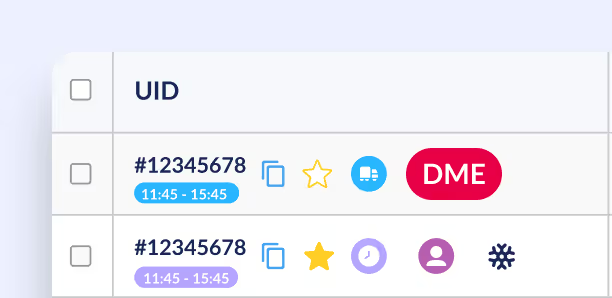
DME & Rx orders automatically populate your delivery dashboard.
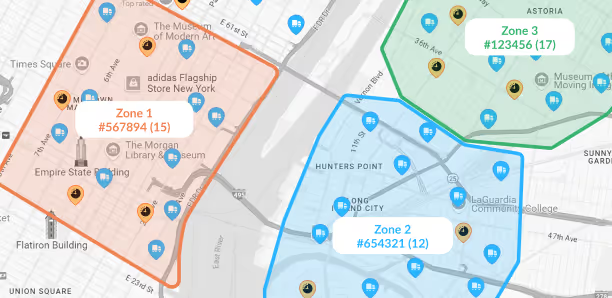
Assign orders, optimize routes, and send drivers out.
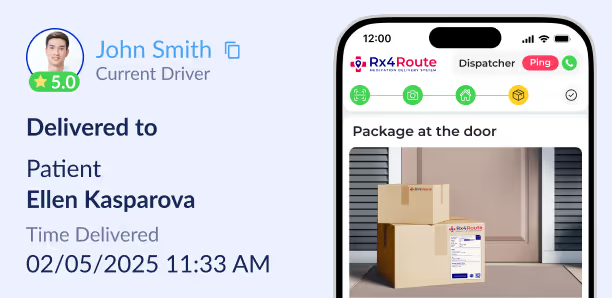
Drivers complete stops with digital PoD and photos.
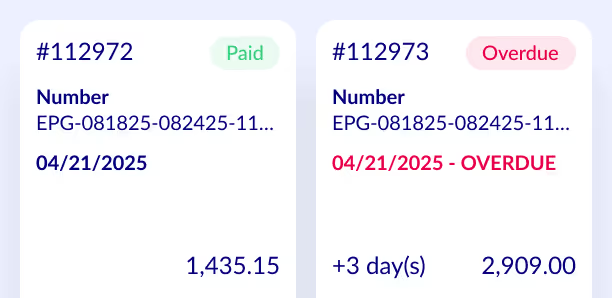
Automatically generated invoices sync back for easy billing.
Connect Rx4Route with your PMS in minutes.
DME & Rx orders automatically populate your delivery dashboard.
Assign orders, optimize routes, and send drivers out.
Drivers complete stops with digital PoD and photos.
Automatically generated invoices sync back for easy billing.
Built for Pharmacy and Medication Delivery Operations
Managing DME deliveries requires an understanding of pharmacy processes and the daily steps involved in conducting deliveries. The Rx4Route solution is based on experience with pharmacy deliveries, medication deliveries, logistics, medical supplies workflows, routing management, software integration, and delivery processes.
Such experience includes:
- Approximately 10 years of experience in pharmacy deliveries and solutions design
- First-hand experience delivering goods from the company’s founder
- Experience with delivering goods with over 1,000 drivers involved
- Expertise with pharmacy and medication deliveries
- Expertise with software integrations and workflow processes
- Specialization in DME, LTC, and medical courier delivery management
DME Delivery Operations the Platform Can Support
DME delivery requirements can vary depending on the type of operation the pharmacy/delivery company performs. The Rx4Route system is designed to help organizations that handle medical supply deliveries alongside other pharmacy-related delivery operations.
The system can be used by:
- Pharmacies doing prescription and DME deliveries
- Multiple location pharmacies
- Pharmacies having DME and LTC deliveries
- Medical couriers dealing with pharmacies
- Delivery systems using multiple drivers/branches
- Organizations requiring centralized delivery documentation/reporting
Business Factors to Evaluate for DME Delivery Software
Core delivery components are not the only criteria in choosing a medical equipment delivery platform. In addition, pharmacies need to evaluate if the system will integrate with their business processes, implementation process, support needs, and scalability.
| Area to Evaluate | What to Consider | Why It Matters |
|---|---|---|
| Implementation | Fit with existing operations | Supports a smoother rollout |
| Data security | Handling of patient and delivery data | Important for healthcare workflows |
| Cost | Software and operating costs | Helps assess overall fit |
| Customer support | Onboarding and ongoing assistance | Supports implementation and use |
| Scalability | Locations, branches, drivers, volume | Supports operational growth |
Preparing a DME Delivery Operation for Implementation
According to Rx4Route, the estimated time frame to implement this solution is 7-14 days. Before implementing delivery scheduling software, pharmacies and the delivery team should identify which systems, delivery methods, locations, and needs the system will meet.
The following should be prepared:
- Pharmacy management systems or API that need to be connected
- Delivery methods such as DME, prescriptions, and LTC deliveries
- Locations or branches of the pharmacy
- Driver and delivery assignment process
- Necessary delivery paperwork
- Billing and invoicing needs
- Copay management needs
- Existing report/audit documentation process
Frequently Asked Questions About DME Delivery Software
Can equipment serial numbers be recorded during a delivery?
Yes. For some clients, the Rx4Route Driver App will allow you to capture documents and serial numbers within the delivery completion workflow. This capability can add equipment-level information to logistics medical supplies workflows during the delivery process.
Can drivers use a Bluetooth scanner during DME deliveries?
Yes. The current driver app allows Bluetooth scanner usage, providing an additional method of capturing labels or products in the field. This can support medical supply deliveries where scanning a device or product is necessary before completing a delivery stop.
Can drivers confirm that special delivery instructions were reviewed?
Yes. The driver app supports instruction confirmation before completing a delivery. This adds another workflow stage for medical equipment delivery with specific instructions, ensuring drivers check the assigned instructions during the delivery process.
Can recipient information be required before completing a delivery?
Yes. Rx4Route is capable of requiring the recipient's name once the package delivery has been set to "Delivered". The driver app also lets drivers validate the recipient type and name for no-contact delivery orders, providing more recipient information during completion.
Are drivers notified when an assigned delivery is rescheduled?
Yes. The current driver app includes a feature that notifies the driver via push notification when a delivery request is rescheduled. This gives delivery scheduling software an additional way to keep drivers informed when assigned delivery timing changes.
Can scan labels help drivers identify delivery items?
Yes. The existing driver application consists of scan labels that assist in recognizing delivery items while scanning. It provides another way for drivers to identify items when they need to separate items related to delivery orders.
Ready to Unify Your Deliveries?
Join hundreds of pharmacies that have stopped wasting time on manual work and started delivering better patient care.
See how Rx4Route works with your specific PMS setup. No commitment.